Forecast Refinement: Choose Projection Types
You can improve your forecast accuracy by providing Cloud Capital with more information about how each of your Cost Layers changes over time.
Projection Types to Choose From
There are many Projection Types to choose from.
- Auto: (Default) Cloud Capital black-box model incorporating historical data and any available signal.
- Trend: future consumption will be based entirely on previous billing period trend.
- Fixed Percentage: Cost Layer grows indefinitely at a defined rate each period.
- Flat: Consumption does not change over time. Costs account for number of days in a billing period. Useful for fixed infrastructure or pre-production environments.
- Automatic Correlation with Business Metric: Costs will scale in relation to a user-provided Business Metric. Cloud Capital will infer the correlation coefficient.
- Correlated 1:1 with Business Metric: Costs will scale in relation to a user-provided Business Metric with 1:1 correlation.
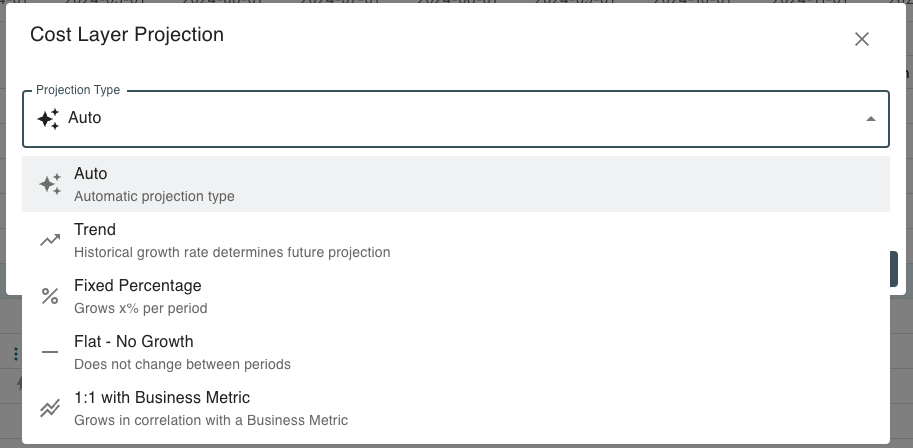
How to Select a Projection Type
Note: Choose the Projection Type in that most accurately describes how your Cost Layer will grow over time. You can make a selection at any level of your Cost Layer hierarchy.
To modify the Projection Type on a given Cost Layer, click the Projection Type indicator in the Cost Layer table to open the dialog.
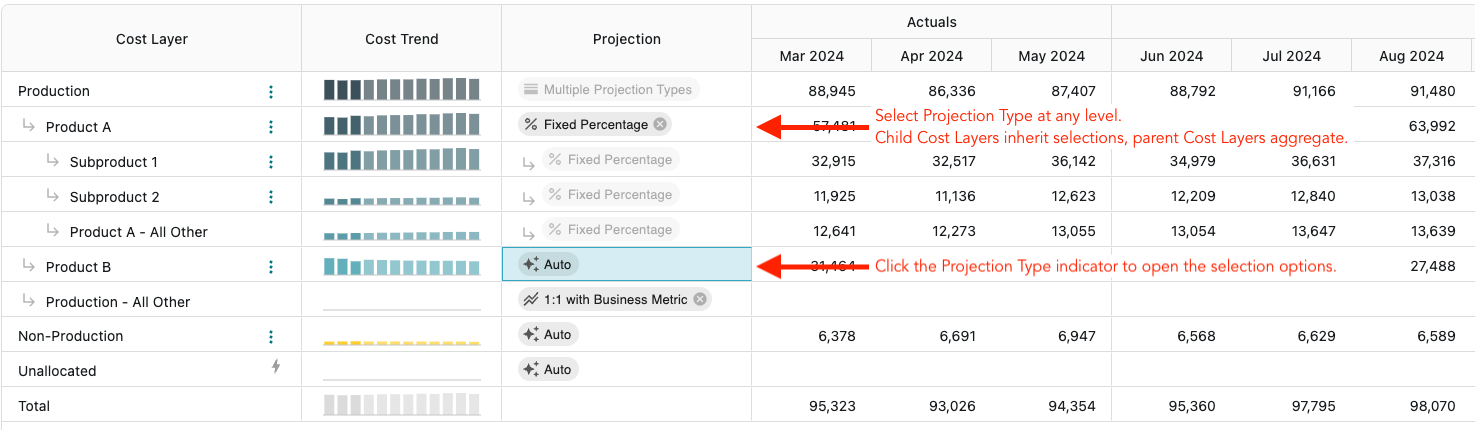
You can choose a Projection Type at any level of the Cost Layer hierarchy. At any level a selection is made, Cost Layers further down the hierarchy will inherit the selected Projection Type. Cost Layers above the layer where a selection is made will aggregate the selections of their children.